Sell more
with ORUS
Products, courses, classes and events, sold through an AI advisor, with a dedicated ORUS onboarding team that connects you to health and wellness communities.
- Agentic commerce
- A dedicated onboarding team
- Health and wellness communities
One place to sell on ORUS.
The seller centre is where a brand, an expert, a club or a host lists what they sell, runs it day to day and gets paid. It is the same account whether you sell one product or run a studio, and a person at ORUS walks you in.
- 01Register
Answer a few questions about what you sell. A person at ORUS reads it and replies within five working days.
- 02Get set up
Your rate is agreed in writing, your page is written for you, and your dashboard opens with your first listing, class or event ready to make.
- 03Sell
The advisor recommends you, the app keeps your customers, and you are paid in your currency. You look after what you sell; ORUS looks after the rest.
Your brand has entered the chat.
- A member asks what would help. The advisor answers with your product, and the reason it fits.
- They add it to the basket without leaving the conversation.
- You list once. The advisor makes the introduction, every day, to the people it fits.
- One advisor, in the app and on the web, knowing every listing from the day it goes live.
No ad spend, no bidding, no keywords. The advisor recommends on fit and says why. How the advisor learns your products

I wake at 3am most nights. What would actually help?
Sleep Mask - Navy£89.00 · Therabody Vegan Nights® | 30 Capsules | Better, Deeper Sleep£17.99 · DR.VEGAN
 Ionic Magnesium Liquid Concentrate – 50ml£20.00 · KIKI Health
I wake at 3am most nights. What would actually help?
Waking at three is usually a cortisol rise rather than a sleep debt. Wind down earlier, and this one is worth trying an hour before bed. It is in the shop.
In your basket. Reorder from the app when it runs low.
✓London✓Kuala Lumpur✓Manchester✓Penang✓Dublin✓Bristol✓Singapore✓Leeds✓Ipoh✓Glasgow✓Johor BahruFour ways to sell on ORUS.
- BrandsProducts
List your range in the shop, beside the classes, courses and experts a customer came for.
Register your brandRead the guide  ExpertsCourses
Publish a course in the studio: lessons, quizzes, a certificate, sold on the web and studied in the app.
Apply as an expertRead the guide Clubs and studiosClasses
Run classes from your club's console: a timetable, bookings, a waitlist, the venue on a map.
Start a clubRead the guide Hosts and clubsEvents
Sell tickets to the things you host: free or priced tiers, QR tickets, the sign-up flow done for you.
Start a clubRead the guide
Run it all from one screen.
admin.orus.uk is your back office. Here is what it does, in plain words, on real screens.
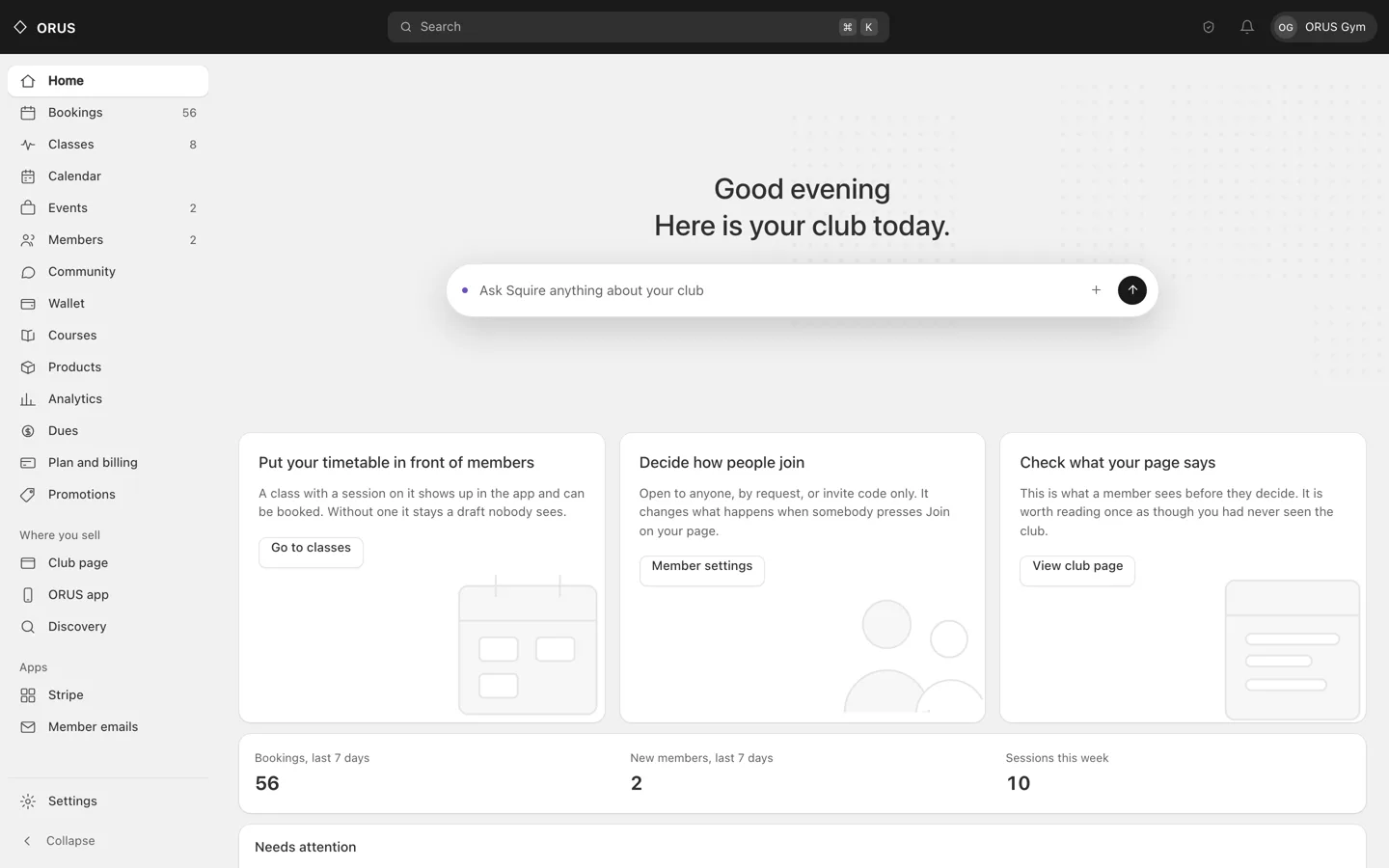
Home. What your club is doing today: bookings this week, new members, what needs attention, and Squire to ask.
- Timetable and calendar
Classes on a timetable, events with tickets, one calendar for both. Click to create; drag nothing by accident.
- Bookings and check-in
Who is coming, who is on the waitlist, who arrived. Scan them in from the grid.
- Members and roles
Owners, admins and coaches with the powers each needs, invites by link or email, a record of every change.
- Community
Rooms for your members, public posts on your page, moderation with a reason that reaches the author.
- Wallet and payouts
Stripe's own ledger, read to you plainly: balance, payouts, fees, and every entry matched to a booking.
- Analytics
Bookings, cancellations, fill rate and your busiest classes over the window you choose. Counts of things that happened, never a score.
- Course studio
Lessons, video, quizzes, drip schedules and certificates. Once you are approved, a course is live the moment you publish it.
- Squire
An assistant that drafts a class, an event or a post from your own data and points you at the right screen. It never touches money or members.
- Settings
Your page, your venues with map pins, your booking rules and refund policy, your payment account.
Ask for it instead of building it.
Squire sits inside the console. Say what you want in plain words and it drafts the thing from your own club, fills the fields, takes you to the right screen, or keeps the list of what is left. Everything it makes is a draft you review, and one press undoes a whole ask.
- Drafts a class, an event, a course or a post from your own data, with where each field came from written beside it, and an empty field where it was unsure rather than a guess.
- Sketches a weekly timetable as days, times and class names for you to place on the calendar.
- Writes the words for a dues plan or a discount code. Every number stays yours.
- Answers from your club's own numbers, and never more than your role can already see.
- Takes you to the control and lights it up, instead of reciting a path.
- Keeps a to-do list for the jobs with several steps, so you can see what is done.
What it never does: move money, set a price, change a role, remove a member, or publish anything to your members. Those buttons are not in its hands, by design, so they cannot be talked into its hands.
Everything sells everything else.
A member who arrives for one thing meets the others. That is what ORUS is for, and it is why a seller in one lane reaches buyers in the rest.
- The advisor
- knows every product, course, class and expert, and recommends across them: a product in answer to a sleep question, then the course that explains it, then the class that practises it.
- The app
- reminds a member to take what they bought, studies the course they enrolled in, books the class and holds the ticket. One place, every offering.
- A club
- runs classes, hosts events, sells its own courses and has a members' room. A brand can run one, and an expert can teach in one.
- An expert
- publishes courses, runs classes, hosts events and answers questions in the community. Their page lists all of it, and the advisor sends people there.
You set the price. Here is what happens to it.
| If you sell | for | you receive | ORUS keeps | in plain words |
|---|---|---|---|---|
| A productusually; your rate is set when you apply | £24.00 | £19.20 | £4.80 | You keep 80% of your price. Delivery label paid by ORUS. |
| A course | £49.00 | £46.55 | £2.45 | You keep 95% of your price. |
| A class | £20.00 | £19.00 | £1.00 | You keep 95% of your price. |
| An event ticket | £30.00 | £29.10 | £0.90 | You keep 97% of your price. |
| A club membership, a month | £15.00 | £15.00 | £0.00 | You keep 100% of your price. |
No sign-up, listing or monthly fee on any lane. A free product, class, course or ticket costs nothing. Your fee is taken on what was actually paid, from the payout, never invoiced.
Start selling on ORUS.
One commission, nothing else. Register this week; your rate is confirmed within five days and you can be live inside two.